
From the Art+Logic archive · written in 2013. The tools may have moved on; the thinking still holds.
I came across a new and interesting open source embeddable web server written in Objective-C for Mac and iOS apps called Barista. It’s inspired by the Express web application framework for Node.js and allows you to compose a processing pipeline by connecting middleware components that operate on the HTTP requests and responses being handled by the server. The framework is being developed by Steve Streza, formerly of Pocket, now gone indie and having also recently released Ohai. It’s early days for the project, could use some help, but is definitely interesting and worth a look.
I spent some time checking out the README on GitHub, read through the source of the project and the included examples, and decided to try and add support for rendering pages formatted using Markdown in addition to the support Barista already has for Mustache templates.
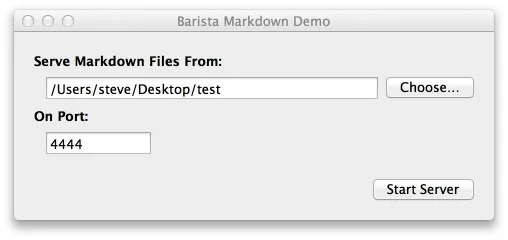
My demo project is available on GitHub at stevenhuey/BaristaMarkdownDemo and when you build and run it should look something like:
The project uses Cocoapods so make sure to have it installed and after you’ve downloaded or cloned the project run a “pod install” to download the dependencies and to create the Xcode Workspace file that you’ll use to build and run the app.
After you’ve got the app built and running, you’ll first need to choose a directory of markdown files (be sure to use a .markdown file extension) to host, select a port, and then click the “Start Server” button. From your favorite browser navigate to localhost:[port]/[filename] . For example, if you use the default port of 4444 and have a file named home.markdown you’d use localhost:4444/home .
The two classes of interest in the sample project are the BaristaMarkdownDemo and MarkdownTemplateRenderer classes. In the former I configure and start a Barista server and in the latter I render markdown files to HTML using MMMarkdown.
In the runWithURL:onPort: method of the BaristaMarkdownDemo class I:
- Create a server instance on the selected port
- Add an instance of our Markdown renderer to the middleware stack
- Add a router and configure it to serve pages for the chosen directory.
- (void)runWithURL:(NSURL*)serverRoot onPort:(NSUInteger)port
{
  _server = [BARServer serverWithPort:port];
   [_server addGlobalMiddleware:[MarkdownTemplateRenderer rendererWithViewsDirectoryURL:serverRoot]];
    BARRouter *router = [[BARRouter alloc] init];
    [_server addGlobalMiddleware:router];
    [router addRoute:@"/:view" forHTTPMethod:@"GET" handler:^BOOL(BARConnection *connection, BARRequest *request, NSDictionary *parameters)
   {
        BARResponse* response = [[BARResponse alloc] init];
        response.statusCode = 200;
        [response setViewToRender:parameters[@"view"]
                     withObject:@{}];
        [connection sendResponse:response];
        return YES;
    }];
    [_server startListening];
}
In our route “:view” will be replaced by the name of the page that the user is requesting, and will ultimately result in the markdown file with the matching filename being rendered as HTML and returned to the user.
-(void)willSendResponse:(BARResponse*)response
             forRequest:(BARRequest*)request
          forConnection:(BARConnection*)connection
        continueHandler:(void (^)(void))handler
{
   NSString* viewName = [response customValueForKey:@"BARTemplateView"];
   if (viewName)
   {
      NSURL *viewURL = [[self.viewsDirectoryURL URLByAppendingPathComponent:viewName] URLByAppendingPathExtension:[[self class] templateFileExtension]];
      NSString* fileAsString = [NSString stringWithContentsOfURL:viewURL
                                                        encoding:NSUTF8StringEncoding
                                                           error:NULL];
      NSString* content = [MMMarkdown HTMLStringWithMarkdown:fileAsString error:NULL];
      NSData *contentData = [content dataUsingEncoding:NSUTF8StringEncoding];
      response.responseData = contentData;
   }
   handler();
}
The renderer is even more simple. I just read the markdown file into an NSString instance, convert it to HTML using MMMarkdown, and return the result.
This is a pretty trivial example but it’s easy to see how Barista could be used to create a pretty custom embedded HTTP server for your next app. Steve Streza is looking for help with a number of features including unit tests, resource mapping to Core Data, and XPC support for Mac OS X. Definitely check out the project and if you have time submit a pull request with your changes.