
From the Art+Logic archive · written in 2019. The tools may have moved on; the thinking still holds.
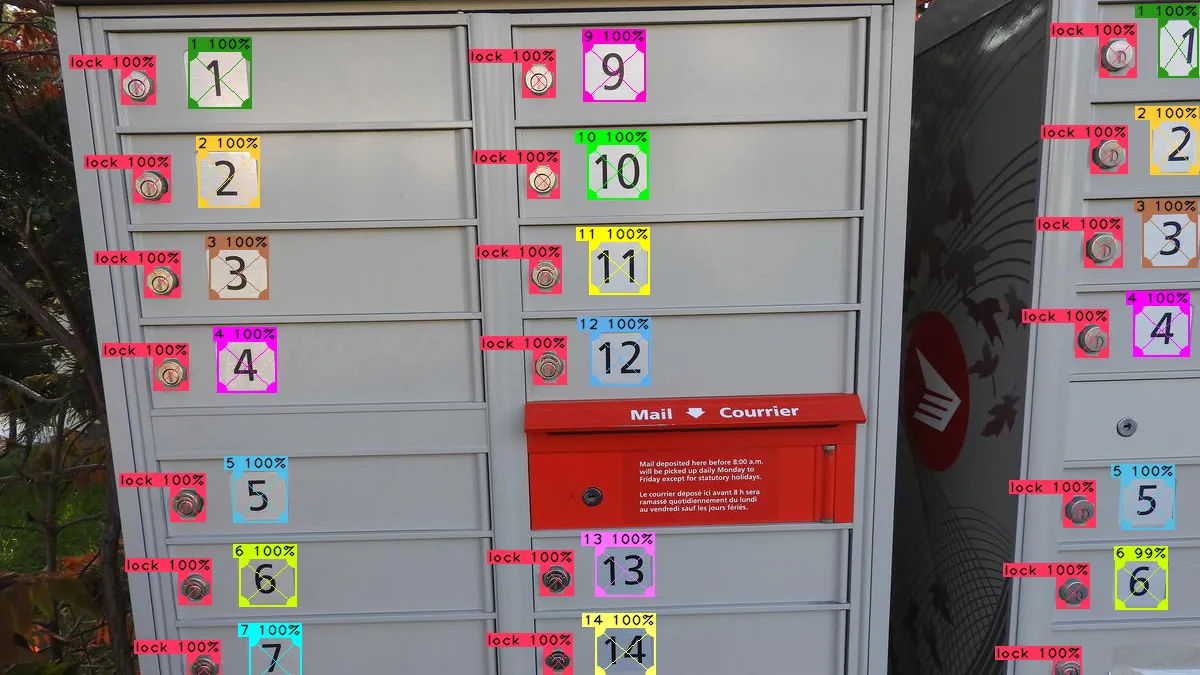
Computers have been around for less than 100 years. In that short period of time, some incredible things have happened: they’ve been universally adopted so quickly that we have them in our houses. In our cars. Even in our pockets. In the last 40 years, there have been many significant events when it comes to computers:
- Continuous decrease in size and increase in power.
- Access to computing at home and at work.
- Networking, the spread of the internet, and acceptance of the web.
- Computers in our hands (cell phones).
Similarly to those past events, an important development in computer science which has the potential to significantly impact the way we develop applications is machine learning and artificial neural networks.
Machine learning is not new, but advances in both hardware and software have recently opened the gate of possibilities. Automated drones and vehicles are capable of getting themselves from point A to point B without (much?) human intervention thanks to machine learning and artificial neural networks. With an extremely small amount of effort, software can now be developed to do incredible things with neural networks which couldn’t be done just a few years ago.
Training
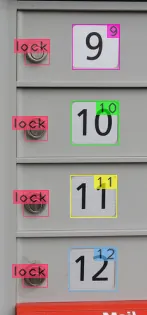
Training an artificial neural network (ANN) is the time-consuming part of the task. Somewhat similarly to how we learn, artificial neural networks are trained using repetition. You show it both what you want, and what you don’t want. Hundreds, or thousands of times. Thankfully, computers are relatively quick at doing repetitive things. For image recognition, you mark up images with software tools to indicate what you want it to learn. For example:
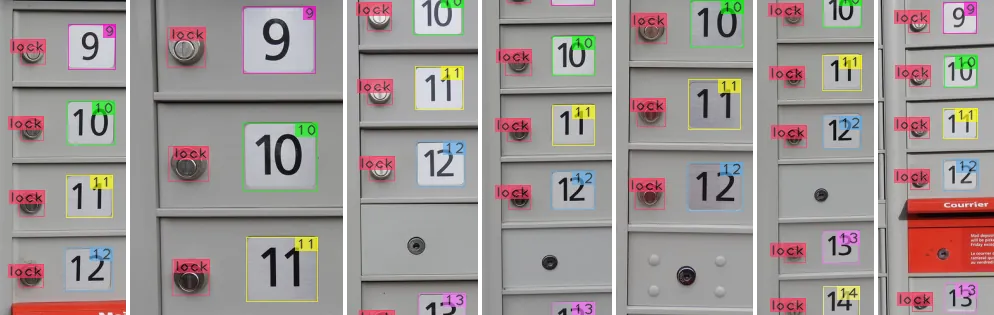
But this doesn’t happen only once. You provide it with a large set of marked up images. Thousands of similar images, all tagged with the things you’d like it to learn to recognize:
Getting the ANN framework to train on these images can take several days with non-trivial neural networks. Prepare to iterate early and often when the network is still small.
Predicting
Once a neural network has successfully trained, the results are impressive. Artificial neural networks can pick up on interesting details that as a developer would either take too long to code or be too complex to make effective solutions.
A simple example:
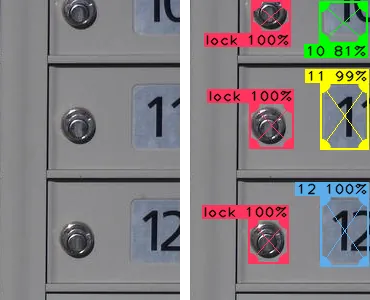
Note in the left image how the numbers 10, 11, and 12 are truncated. When looking at this image, it is easy for us to discern the pattern and guess the top number is 10. And if we had to write software to detect truncated numbers like this, it certainly can be done. But here is the thing: as an experienced developer, I know that software to process these images would probably skip over these numbers for the following reasons:
- It is (literally!) a difficult corner case.
- Complexity of image processing is increased significantly when part of the image is missing.
- How to program software generically so it would recognize not just
10, but any number with > 50% of the digits missing? - Exactly how much of the number needs to be visible/obscured for the image to be viable?
With the above right-hand-side results from our ANN, all of these issues are automatically handled. And the prediction for 10 still came in at 81% probability, which is likely to be a decent enough certainty to accept as a valid prediction in many cases.
How do we do it?
The examples in this post were done with darknet, an open-source neural network framework.
From within C++, an application can use an existing neural network in about 3 lines of code:
// Load the neural network configuration and weights which
// will be used to make predictions.
// We use "DarkHelp", an open-source C++ wrapper library for libdarknet.so.
DarkHelp darkhelp("mailboxes_yolov3-tiny.cfg", "mailboxes_yolov3-tiny.weights",
   "mailboxes.names"));

// Use standard OpenCV calls to load a .jpg image into memory.
cv::Mat mat = cv::imread("test_image.jpg");

// Darknet will process the image and store all of the
// prediction results in a std::vector.
const auto predictions = darkhelp.predict(mat);

// Each prediction in the vector contains the X and Y coordinates of the object,
// the width and height, the class (meaning the type) of object, a name to use for
// that class, and a value to indicate the probability from 0 to 100%.  For example,
// to iterate over all the predictions made by darknet and print a few values:
for (const auto& p : predictions)
{
    std::cout << "found '" << p.name << "' at "
      << "x=" << p.rect.x << ", y=" << p.rect.y << std::endl;
}
The DarkHelp::PredictionResult structure can also be streamed via operator<<(), so sending the entire vector of results to a file or std::cout for this image:
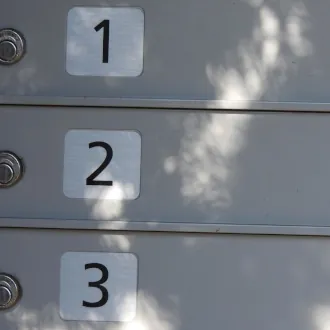
…would look like this:
darkhelp processed the image in 645 milliseconds
prediction results: 6
-> 1/6: "3 94%" #3 prob=0.943488 x=147 y=672 w=206 h=186 entries=1
-> 2/6: "2 98%" #2 prob=0.980147 x=156 y=317 w=225 h=232 entries=1
-> 3/6: "1 94%" #1 prob=0.940242 x=178 y=16 w=189 h=195 entries=1
-> 4/6: "lock 87%" #0 prob=0.869531 x=5 y=89 w=65 h=73 entries=1
-> 5/6: "lock 86%" #0 prob=0.855969 x=7 y=415 w=55 h=79 entries=1
-> 6/6: "lock 83%" #0 prob=0.833342 x=5 y=731 w=56 h=88 entries=1
And if we were to annotate that image with these results to indicate where objects of interest were detected, the results look like this:
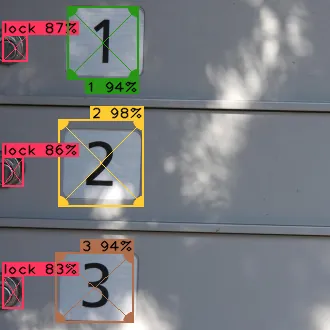
No software developer would want to contemplate having to write, much less maintain!, the hand-written code necessary to accurately determine the location and type of every object of interest in complex images like this one:
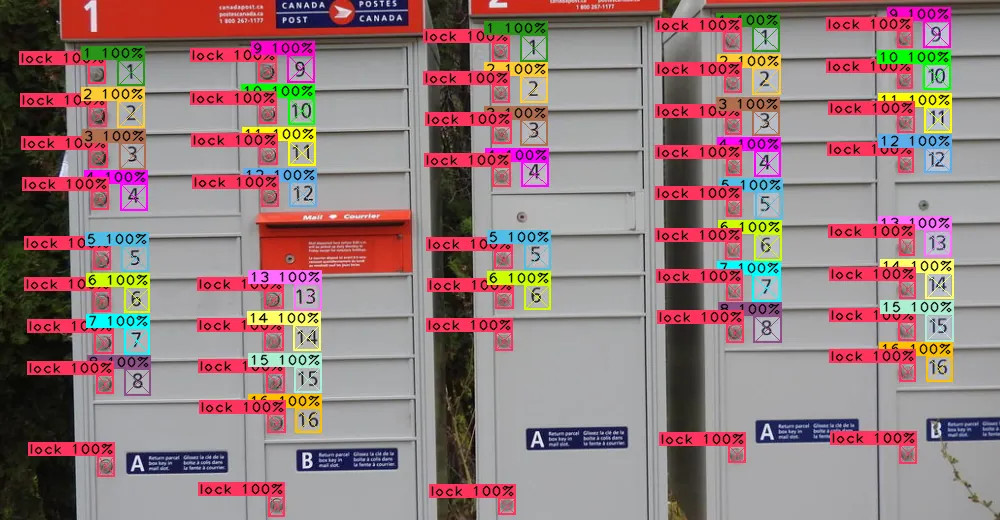
But with machine learning, the good news is we don’t have to do it manually. In less than 5 lines of code and a few milliseconds to run, all 82 objects of interest that artificial neural network was trained to find were returned:
loading image mailboxes/set_02/DSCN0625.JPG
darkhelp processed the image in 533 milliseconds
prediction results: 82
-> 1/82: "16 100%" #16 prob=0.99999 x=397 y=666 w=26 h=25 entries=1
-> 2/82: "16 100%" #16 prob=0.999869 x=1047 y=612 w=27 h=27 entries=1
-> 3/82: ...
This is how we do it. Coding the “impossible.”