
// I need to

ModernizeUpgrade without breaking it RescueFix what someone else started Build NewTurn an idea into a product Reach More PeopleGet found, get used, include everyone

// Company

Case StudiesExpertiseAbout + CareersResourcesContact Book a call →
≡articleBuild New

Interactive Widgets in IPython Notebooks

Create interactive graphs that are simple to share using the widgets added in IPython 2.0. A starter example plus a notebook to download and try.

Art+Logic Jun 17, 20141 min read

From the Art+Logic archive · written in 2014. The tools may have moved on; the thinking still holds.

This post will show you how to easily create interactive graphs which are simple to share.
Software screen capture

IPython notebooks are a really nice way of sharing Python snippets intermingled with the results of those snippets and markdown.

They’re popular in the scientific community and are used in education (from Harvard CS109). IPython is well supported and documented, and is actually kind of a delight to use.

The creator, Fernando Perez, gave a keynote at PyCon US 2014 (there are a bunch of other talks worth watching too).

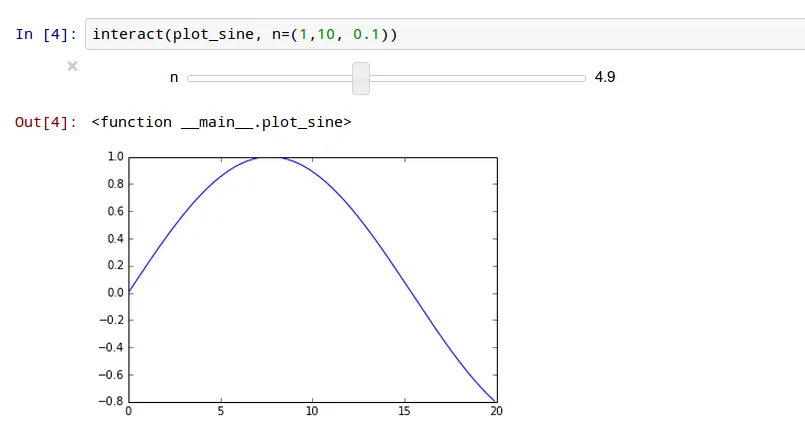
In release 2.0.0 in April 2014 IPython added interactive widgets. Interactive widgets provide gui inputs for you to interact with, for example, a graph. Here’s the simplest example I could come up with:

Software screen capture

to try this for yourself:

Then once you’ve executed the code cells (by pressing play in the toolbar while focused on the cell) you should be able to interact with the plot. Enjoy!

keep going

More to explore in Build New.

All Build New resources →
let's talk

Got a problem like this one?

Tell us what's stuck. A real person replies within one business day.

Talk to our team →

Talk to people who know software, not a sales script.

Your first call is with Aja, our VP of Sales. He'll help make sure you're solving the right problem. Here's what you'll cover together:

  1. What you're trying to accomplish

    The business goal first, then the technology.

  2. Possible approaches

    And the tradeoffs of each, in plain language.

  3. Risks you may not have considered

    Technical and business, before they cost you.

  4. Whether AI changes the math

    What's practical, and what's just hype for your project.

  5. Sensible next steps

    Even if the right next step is not us.

book-a-call.ics

Loading the scheduler…

Open the booking page →

Some problems are easier to explain in writing. Send us a few lines about what you're working on, and we'll reply within one business day. Helpful to include:

  1. What the software does, or should do
  2. What's stuck, or what's worrying you
  3. Any deadline or budget you have in mind
note.md

Loading the form…