
Legacy software creates a strange kind of tension.
On one hand, it may be slow, brittle, expensive to maintain, hard to integrate, difficult to hire for, or increasingly risky from a security and compliance standpoint. On the other hand, it probably exists for a reason. It runs the workflows your business depends on. It contains years of operational knowledge. It encodes decisions, edge cases, user expectations, and business logic that may not be documented anywhere else.
That’s why application modernization is rarely as simple as “rewrite it” or “move it to the cloud.”
The common “5 Rs” framework can be useful, but only if you treat it as a decision model, not a menu of buzzwords. The right modernization path depends on what the system does, where the risk lives, how much business value the current software still provides, and what future you need it to support.
At Art+Logic, we’ve spent more than 30 years designing, building, rescuing, and modernizing custom software. Our view is simple: the best modernization strategy is the one that improves the system without losing what made it valuable in the first place.
For organizations evaluating legacy software modernization, the 5 Rs are a helpful starting point. But choosing among them requires more than a technical inventory. It requires judgment.
First: Modernization Starts With Understanding
Before choosing a path, you need to understand what you actually have.
That sounds obvious until you’re inside a legacy system that has been evolving for 10, 15, or 25 years. Business rules may be buried in code. Integrations may depend on undocumented behavior. A “weird” workflow may exist because a key customer, regulator, or operational team depends on it. A report no one wants to touch may drive executive decisions every Monday morning.
This is where many modernization projects go sideways. They start by asking, “What technology should we move to?” when the better first question is, “What value does this system provide, and where is it holding us back?”
That distinction matters.
Modernization should not preserve every old technical decision. It should preserve the business value those decisions created while removing the constraints that prevent the organization from moving forward.
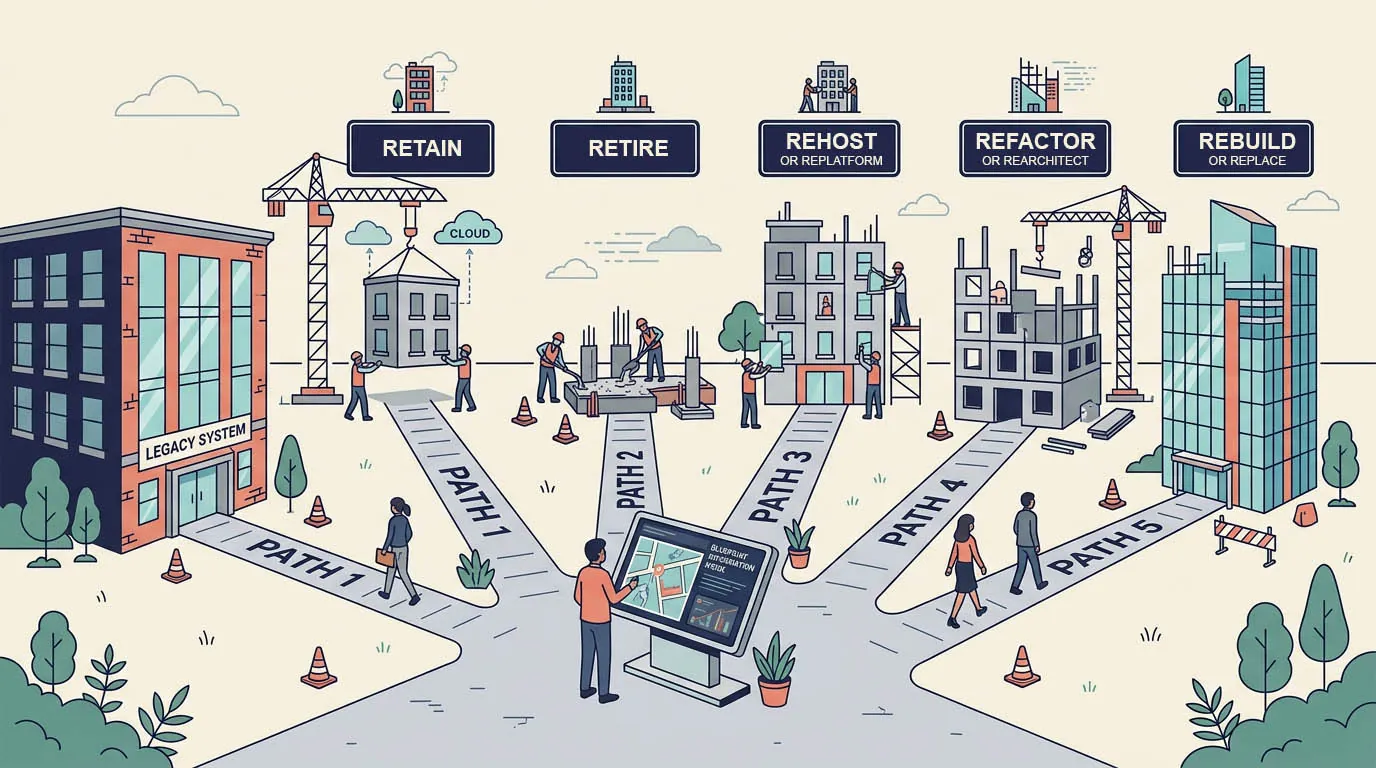
Our 5 Rs of Application Modernization
Different companies define the Rs differently. Some versions come from cloud migration. Others are adapted for enterprise architecture or application portfolio planning. For legacy software, we find the most practical version is this:
- Retain
- Retire
- Rehost or Replatform
- Refactor or Rearchitect
- Rebuild or Replace
Each path has a place. The mistake is assuming one of them is inherently more modern than the others.
Sometimes the smartest move is to rebuild. Sometimes it’s to refactor a critical module. Sometimes it’s to leave a stable system alone and focus resources elsewhere. Good modernization is not about changing everything. It’s about changing the right things in the right order.
1. Retain: Keep What Still Works
Retaining a legacy application may not sound like modernization, but sometimes it is the right decision.
Not all legacy software is broken. Some systems are old but stable. They may run a narrow business process, serve a small internal audience, or perform reliably with minimal maintenance. Replacing them too soon can create more risk than value.
Retain is the right path when:
- The system is stable and low-risk
- Maintenance costs are predictable
- The business process is not changing significantly
- The application has limited integration, security, or compliance exposure
- Modernizing it would distract from higher-priority work
The key is that “retain” should be an active decision, not neglect in disguise.
If you choose to keep a system, document why. Identify what would cause you to revisit the decision. Monitor risk factors like unsupported dependencies, aging infrastructure, security exposure, vendor end-of-life timelines, and the availability of people who still understand the system.
A retained application still needs stewardship. Otherwise, today’s reasonable decision can become tomorrow’s emergency.
2. Retire: Remove What No Longer Creates Value
Some legacy systems are not worth modernizing.
They may support obsolete processes, duplicate newer tools, or exist only because no one has taken the time to shut them down safely. In those cases, retirement can be the highest-ROI modernization move available.
Retirement is not simply turning something off. It often requires careful discovery:
- Who still uses the system?
- What data needs to be archived?
- Are there downstream dependencies?
- Are there compliance or audit requirements?
- Does another system need to absorb part of the workflow?
- What communication and training will users need?
This is where a legacy portfolio can surprise you. A system that appears unused may still generate a monthly export for finance. A database that seems obsolete may contain historical records required for compliance. A dusty internal tool may be the only place a support team can look up a specific customer scenario.
Retirement works best when it is deliberate. The goal is not just to remove old software. It is to reduce complexity without breaking an invisible process the business still depends on.
3. Rehost or Replatform: Move the System to a Better Foundation
Rehosting and replatforming are often grouped together, but they are not exactly the same.
Rehosting usually means moving an application to new infrastructure with minimal code changes. Think of moving from on-premises servers to cloud infrastructure. Replatforming goes a step further by making targeted changes so the application can run more efficiently or reliably on a new platform.
This path can make sense when the application still provides value, but the environment around it is becoming a problem.
Choose this path when:
- Infrastructure is expensive, fragile, or hard to support
- The application needs better scalability or uptime
- Hardware or hosting environments are nearing end of life
- Cloud migration would reduce operational burden
- You need a safer first step before deeper modernization
Rehosting or replatforming can reduce risk, improve reliability, and create room for future work. But it is not a cure-all.
Moving a brittle system to modern infrastructure does not automatically make the codebase healthier. A cloud migration can improve operations while leaving product debt, design debt, process debt, and architectural constraints untouched.
That is not a reason to avoid it. It is a reason to be honest about what this path solves and what it does not.
4. Refactor or Rearchitect: Improve the System Without Starting Over
Refactoring is one of the most misunderstood modernization paths.
It does not mean rewriting the application from scratch. It means improving the internal structure of the system while preserving its essential behavior. Rearchitecting goes deeper, changing how major parts of the system are organized so it can support new scale, features, integrations, or operating models.
This is often the sweet spot for legacy modernization.
Refactor or rearchitect when:
- Small changes take too long
- Developers avoid parts of the codebase
- Bugs keep returning after they are “fixed”
- New hires need months to become productive
- Integrations are painful
- Testing is weak or inconsistent
- Security and dependency updates are risky
- The system works, but every improvement feels harder than it should
This is where the ROI of modernization becomes visible.
Old code quietly taxes the business. Releases slow down. QA cycles stretch. Engineers spend more time avoiding regressions than shipping value. Customer requests pile up behind architectural limitations. Strong developers become frustrated by a system that fights them at every step.
Refactoring pays that debt down strategically. It clarifies intent, improves modularity, removes brittle dependencies, strengthens test coverage, and makes the application easier to reason about.
The goal is not technical perfection. It is momentum.
For many organizations, the right refactoring strategy is incremental. Isolate the highest-friction areas. Create seams in the architecture. Improve test coverage around critical behavior. Replace risky dependencies. Modernize the parts of the system that directly block business goals.
That approach reduces risk because the current system can continue operating while the new foundation takes shape.
5. Rebuild or Replace: Start Fresh When the Current System Can’t Support the Future
Sometimes the old system has reached the end of its useful life.
A rebuild or replacement may be the right path when the current application is fundamentally misaligned with where the business needs to go. Maybe the architecture cannot scale. Maybe the user experience is beyond incremental repair. Maybe the core platform is no longer supported. Maybe the application was built for a business model that no longer exists.
This path can unlock major value, but it also carries the highest risk.
Rebuild or replace when:
- The current architecture cannot support strategic goals
- Maintenance costs are unsustainable
- Critical dependencies are obsolete or unsupported
- Security or compliance risk is too high
- The UX needs more than cosmetic improvement
- Business workflows have changed dramatically
- Incremental modernization would cost more than a clean build
The danger is assuming “new” automatically means “better.”
Full rewrites often underestimate how much institutional knowledge lives in the current system. Teams discover edge cases late. Reports turn out to be more complex than expected. Integrations have hidden dependencies. Users rely on behaviors that were never documented.
A successful rebuild needs more than a modern tech stack. It needs a migration strategy, stakeholder alignment, parallel operation where appropriate, data planning, testing discipline, and a clear understanding of what must be preserved.
In many cases, the safest rebuild is not a big-bang replacement. It is a staged transition where old and new systems operate side by side while workloads move gradually.
How to Choose the Right R
The right modernization path usually becomes clearer when you evaluate the system across four dimensions: business value, technical risk, operational disruption, and future fit.
Business value
Start by asking what the system makes possible.
Does it support revenue? Customer experience? Internal operations? Compliance? Reporting? Specialized workflows? Institutional knowledge?
A high-value system deserves careful modernization. A low-value system may be a candidate for retirement. A system with hidden value needs discovery before any major decision is made.
Technical risk
Look for the risks that are already accumulating.
Outdated frameworks. Unsupported libraries. Security vulnerabilities. Aging infrastructure. Fragile deployments. Poor test coverage. Performance bottlenecks. Lack of documentation. A shrinking talent pool.
Technical risk is not just an engineering concern. When it slows delivery, raises costs, or threatens reliability, it becomes a business issue.
Operational disruption
Modernization should not require the business to stop moving.
Internal teams still need to support users. Customers still need service. Operations still need continuity. A technically elegant plan that creates unacceptable disruption is not a good plan.
This is why incremental modernization is often more effective than rip-and-replace. It lets teams make progress while reducing the chance of a major operational shock.
Future fit
Finally, ask what the software needs to support next.
Do you need AI readiness? Better data access? Cloud scalability? Modern APIs? Mobile capabilities? Faster feature delivery? More reliable compliance updates? A better user experience?
The modernization path should be judged by what becomes possible afterward.
The Art+Logic Difference: The 5 Rs Are Not a Shortcut Around Judgment
The 5 Rs are useful, but they do not make the decision for you.
That is where experience matters.
After more than 30 years of custom software development, we have learned that legacy systems are rarely just old code. They are business systems. They carry history, constraints, workflows, and trade-offs. They also carry opportunity.
Our approach is not to force every client into a full rewrite, a cloud migration, or a tool-driven transformation. We help determine what to keep, what to fix, what to modernize, and what to replace.
That work often involves:
- Understanding the current system before changing it
- Preserving critical business logic
- Collaborating with internal IT teams instead of bypassing them
- Reducing disruption through phased delivery
- Aligning modernization decisions with business outcomes
- Using AI-assisted development where it accelerates safe, repeatable work
- Keeping experienced engineers in the loop for architecture, validation, testing, and quality
AI has changed what is possible in modernization, especially for analysis, repetitive migration tasks, boilerplate conversion, and pattern-based refactoring. But AI is not a replacement for engineering judgment.
Used carelessly, AI can produce code that compiles while removing important functionality. Used well, it becomes a force multiplier for experienced teams that know how to validate behavior, preserve logic, and maintain architectural consistency.
That balance matters. Speed is valuable only when it does not create a new layer of risk.
A Practical Decision Guide
Here is a simple way to think about the 5 Rs:
| Modernization path | Best fit | Watch out for |
|---|---|---|
| Retain | Stable systems with low risk and clear ongoing value | Passive neglect disguised as strategy |
| Retire | Obsolete, duplicative, or low-value systems | Hidden users, data, reports, or dependencies |
| Rehost/Replatform | Valuable systems held back by infrastructure | Moving technical debt without reducing it |
| Refactor/Rearchitect | Systems that work but slow delivery, scale, or reliability | Endless cleanup without business prioritization |
| Rebuild/Replace | Systems that cannot support the future | Underestimating embedded business logic |
No single path is always right. Most organizations need a mix.
A legacy portfolio might include one application to retire, one to rehost, one to refactor, and one to rebuild over time. The strategic work is sequencing those decisions so the business gains value without absorbing unnecessary risk.
Modernization Is Controlled Evolution
The best modernization efforts do not begin with a dramatic declaration that everything must change.
They begin with a clear-eyed assessment.
What still works? What is costing too much? What creates risk? What blocks growth? What needs to be preserved? What future should this system support?
From there, the path becomes more practical.
Retain what is stable. Retire what no longer serves the business. Rehost or replatform where infrastructure is the bottleneck. Refactor or rearchitect where the system needs to evolve. Rebuild or replace when the old foundation can no longer carry the future.
Modernization is not about replacing the past. It is about creating a stronger foundation for what comes next.
And done well, it does not have to disrupt the business to transform it.
FAQs
What are the 5 Rs of application modernization?
The 5 Rs of application modernization are commonly used paths for deciding what to do with legacy software: retain, retire, rehost or replatform, refactor or rearchitect, and rebuild or replace. The right choice depends on the system’s business value, technical risk, operational impact, and future requirements.
Is refactoring the same as rewriting?
No. Refactoring improves the internal structure of existing software while preserving its behavior. Rewriting means rebuilding the application from scratch or replacing it with a new system. Refactoring is often a lower-risk modernization path when the current system still provides value but has become difficult to maintain or extend.
When should a company rebuild legacy software?
A rebuild may make sense when the existing system cannot support future business goals, has unsustainable maintenance costs, depends on obsolete technology, creates serious security or compliance risk, or requires user experience and architecture changes that cannot be solved incrementally.
Why is incremental modernization often better than rip-and-replace?
Incremental modernization reduces disruption by allowing the current system to keep operating while targeted improvements are made. This approach helps preserve business continuity, validate decisions along the way, and reduce the risk of losing critical workflows or embedded business logic.
How can AI help with legacy software modernization?
AI can accelerate modernization by assisting with code analysis, repetitive migration work, boilerplate generation, and pattern-based refactoring. However, AI works best when experienced engineers guide the architecture, validate generated code, test behavior, and ensure critical business logic is preserved.