
From the Art+Logic archive · written in 2013. The tools may have moved on; the thinking still holds.

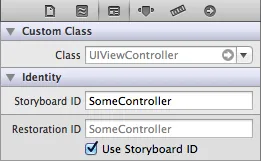
When implementing view state preservation in an iOS app, it’s important to handle the case of restoring state after an app upgrade. The iOS state preservation APIs automatically encode the restoration IDs of view controllers in order to recreate those controllers after an app restart.
However, if in the normal course of developing a new version of the app those restoration IDs are changed or removed, your users will be greeted with multiple app crashes on startup after upgrading. The console log will show an error message like:
NSInvalidArgumentException, reason: Storyboard doesn’t contain a view controller with identifier ‘SomeController’
The state restoration APIs were not written to quietly ignore errors, but at least, after a few crashes in a row, iOS will delete the stored state and allow the app a fresh start.
A simple solution to avoid these crashes during app state restoration is to:
- Compare your app’s version number to the version number automatically stored by iOS during the last app state preservation
- Cancel state restoration if the version numbers don’t match
iOS stores the app version number string under the UIApplicationStateRestorationBundleVersionKey key.
Code for the app delegate’s state restoration methods:
- (BOOL)application:(UIApplication*)application
shouldSaveApplicationState:(NSCoder*)coder
{
   return YES;
}
- (BOOL)application:(UIApplication*)application
shouldRestoreApplicationState:(NSCoder*)coder
{
   BOOL restore = YES;
   // Compare the app version number to the preserved number.  If they differ,
   // cancel state restoration.
   NSString* version =
      [[[NSBundle mainBundle] infoDictionary] objectForKey:@"CFBundleVersion"];
   NSString* storedVersion = [coder decodeObjectForKey:
      UIApplicationStateRestorationBundleVersionKey];
   restore = [version isEqualToString:storedVersion];
   return restore;
}
After a routine restart, the app version numbers will match and state restoration will proceed smoothly. Restarting after an upgrade will cancel state restoration, and start the app from its initial state.
It’s also possible to encode a custom UI version number during state preservation and check it during restoration. If the UI changes (in ways that could break preserved state) less frequently than new versions of the app, this alternative will allow state restoration to only be canceled when absolutely necessary.
However, it seems safer to rely on the app version number string, which Apple enforces changing with every release, rather than a custom string that developers need to remember to update less frequently. The code presented here is a foolproof method for preventing at least certain undesirable crashes on startup.