
// I need to

ModernizeUpgrade without breaking it RescueFix what someone else started Build NewTurn an idea into a product Reach More PeopleGet found, get used, include everyone

// Company

Case StudiesExpertiseAbout + CareersResourcesContact Book a call →
≡articleBuild New

Beef up your text editor on Mac OS X

Extend any Mac OS X editor with Services and Automator. Reflow 80-column comments in Xcode by handing the text to Emacs through a Run Shell Script action.

Art+Logic Mar 6, 20141 min read

From the Art+Logic archive · written in 2014. The tools may have moved on; the thinking still holds.

Corn planting, Jasper County, Iowa, 1940 by Vachon, John, 1914-1975, photographer

This is a gentle reminder that you are not forced to limit yourself to any app’s built-in features when you work on Mac OS X thanks to Services with an assist from Automator. I recently utilized Automator’s Run Shell Script action to create a needed function in Xcode’s text editor.

My problem is that I follow a style guide that limits line length to 80 characters. I usually don’t have trouble with this. Xcode will show a gutter line to help prompt me to break my lines around the limit. But when editing multi-line comments it becomes a pain to reflow the new text. Other editors can do this without my help.

The hockey assist in this story goes to Emacs which has an intelligent function for reflowing text. I knew of this, but I didn’t know that as of a recent Emacs release I could finally tie that function to Xcodes’s editor. Emacs can run elisp scripts on launch, meaning that I can pass it some text, Emacs processes it, and with the Run Script action I get the results back in my editor window.
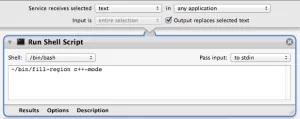
Software screen captureHere’s the shell script which invokes Emacs and calls its fill-region function. Props to the StackOverflow answer here.

Save that script and make it executable, then create an Automator action to launch that script and check the options to replace selected text. Save it as a Service, and that’s it. Assign it a key command sequence for even more convenience. It’s that simple to make any text editor a beast.

keep going

More to explore in Build New.

All Build New resources →
let's talk

Got a problem like this one?

Tell us what's stuck. A real person replies within one business day.

Talk to our team →

Talk to people who know software, not a sales script.

Your first call is with Aja, our VP of Sales. He'll help make sure you're solving the right problem. Here's what you'll cover together:

  1. What you're trying to accomplish

    The business goal first, then the technology.

  2. Possible approaches

    And the tradeoffs of each, in plain language.

  3. Risks you may not have considered

    Technical and business, before they cost you.

  4. Whether AI changes the math

    What's practical, and what's just hype for your project.

  5. Sensible next steps

    Even if the right next step is not us.

book-a-call.ics

Loading the scheduler…

Open the booking page →

Some problems are easier to explain in writing. Send us a few lines about what you're working on, and we'll reply within one business day. Helpful to include:

  1. What the software does, or should do
  2. What's stuck, or what's worrying you
  3. Any deadline or budget you have in mind
note.md

Loading the form…