
From the Art+Logic archive · written in 2013. The tools may have moved on; the thinking still holds.

I have been working on licensed PHP/Yii webapp that is highly customizable. Clients can specify all sort of custom views, behaviors, and workflows. We were running into situations where one client wanted a page to look one way, and another wanted it to look another way. After a feeble attempt to keep customizations restricted to css changes only, we began weaving a tangled web of conditional statements, duplicate code, and duplicate templates. We figured there must be a better way. It turns out there was, and Yii theming was the answer.
The Problem
The app is login protected, and each user is tied to a particular client. So once the user logs in, the particular client instance is loaded. Each client is allowed a wide range of customizability to support their specific workflow. The customizations really have no bounds, much to the chagrin of us developers. Ranging from branding changes to customized help screens, each customer is given the ability to tweak and change the way the app looks and behaves at will. So we needed to come up with a maintainable solution for managing all the view customizations, without having a bunch of duplicate code lying around.
The Solution…
In essense, we created a custom themes for each client requiring tweaks. This might sound like a lot of cruft. But the way Yii theming works, we only have to add view files that differ from the default views. Yii will look in the client theme directory for a view file first. If it’s found, it will use it. If it’s not, it will fall back on the default view file in protected/views. The trick is dynamically setting the Yii theme variable once the user/client has been loaded. Here’s how it worked:
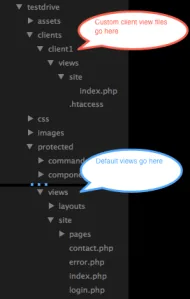
- Update the themeManager basePath to use the ‘clients’ folder. This step isn’t really necessary, but putting the client specific view files in a folder named ‘clients’ instead of ‘themes’ seemed a bit more logical.
- In initialization code, lookup the client template path parameter. Our application used a custom class that extended CWebApplication, which allowed us to put the initialization code in init(). The details of how the client is loaded isn’t important, it’s mostly about setting the
Yii::app()->theme variable. - Now, create your overriden client view files at
../clients/<customer_name>/views. If the view files exists in this directory, Yii will use it. Otherwise, it will fall back on the ones in /protected/views/.
..
'components' = array(
    ...
    'themeManager'=> array(
        'basePath' => dirname(__FILE__).DIRECTORY_SEPARATOR.'../clients',
    )
)
MyApplication extends CWebApplication
{
function init()
{
$client = getClient();
if (isset($client))
{
$templatePath = $client->getVar('templatePath');
if (isset($templatePath) && $templatePath != 'default')
{
$this->theme = $templatePath;
}
}
}
}